• Tutorials
  • Blogger Themes
  • Blogger SEO
  • Blogger Widgets
  • Internet
  • Mobile Phones
  • Gadgets
BloggerHero - Blogger Tuts, SEO, Themes, Gadgets
  • Home
  • Blogger
  • SEO
  • Themes
  • Internet
  • Widgets
  • Gadgets
  • About
  • search
    close
    Typography plays an important role in aesthetics of any blog, it is so important that the font on your blog does put an impact on readability of the article that your user is reading. Many people still use basic old school Arial, Times New Roman, Verdana fonts but oh boy, this is 2019 and this game needs to be on another level! So today I am going to share how to add Google Font to your blogger template or blogger theme. If you are a blogger template designer then this is really important that you must play with different typography fonts with your theme. So let's get started.

Basic Google Fonts 


    You can open Google Fonts at fonts.google.com and the most important thing to notice is that there are tons of fonts which you can actually use on any website. All these fonts are hosted on Google's own servers so you don't even have to worry about any hosting.You can explore the Google Fonts such as Categories, Languages and Font Properties. I usually prefer Sans Serifs as they are suitable for minimalist themes but you are free to choose your own preferred font.

Steps to Add Google Font to Blogger Template

  1. Select your google font from main page.
  2. Click on Select Font at right top corner.
  3. Click on Customize, if you want more styles you can tick the Font Weight (more ticks, more loading time)
  4. Click on Embed and copy the Code in Standard (You can also copy the @import code which needs to be pasted in CSS of your template)
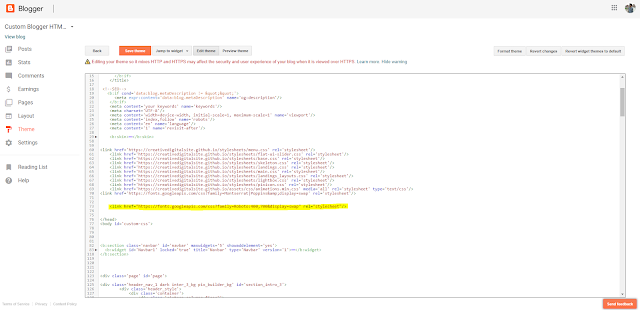
  5. After copying the code, just paste the code in </head> of your blogger template.
  6. To apply the font, you will have to add the CSS code mentioned in "Specify CSS".
  7. Just copy that code and paste it in blogger template, but make sure you add the CSS property Font-Family to your CSS Codes. Such as to headings or any css ID or Class which is applied to text section. (Write down in comment section if you want to know more how to do this).
  8. You are done.
That's it, feel free to comment if you have any queries or issues or suggestions.
Do check out tutorial I wrote about How to add custom fonts to any website, more Tuts coming soon! Stay Subscribed.

author blogger, Google, how to 09:03
So finally after 2 billion years, I am back on BloggerHero with some amazing tricks & ideas to use Blogger platform in many creative ways (Of course it is FREE Hosting after all) which will help you creating sites with either no money or better than your current hosting. 
I was busy with few many experiments since last week and thus will share soon, I will be starting a Youtube Channel as well to demonstrate all of these things I have been working on recently.
But today, first time in the history, I found a way to create a static website on Blogger by Hosting Files such as CSS, JavaScript, Font Files on GitHub, so technically speaking we can create a static website with Unlimited Hosting (You'll have to buy domain anyway) as Blogger and GitHub can store data for Lifetime(Unless they crash and all data gets deleted by these companies)

blogger and github

Basic Idea 

  1. Create a Basic Blogger Blog.
  2. Delete template code or replace with one I will be sharing.
  3. Paste or Create your own HTMLCode (I may start a series of blog posts regarding HTML and CSS)
  4.  Time for GitHub, create a repository on GitHub and upload your files there, files such as CSS (Cascading StyleSheets), JavaScripts, Custom Fonts (Font Icons etc)
  5. Just simply put all the file direct links of these uploaded files and boom, your blogger custom template will be ready.
I have tested with this following blog with some random HTML Source code I had, I hosted files on GitHub, updated and everything worked perfectly, check it out yourself!


Live Demo

This is just a basic informative post, I'll be writing step by step tutorial about how you can create your own Custom Static Website using Blogger and GitHub. Also I am going to start a Beginner Series where you can learn creating blogs and basic modifications. Also we will be having new blogger template this month so stay tuned.
Please let me know if you have any queries, requests or suggestions, I will be happy to assist.
Do share with your buddies and I will catch you in next post with step by step tutorial to build easy blogs and websites!

author blogger, css 08:42
      Since billions of years, I have been experimenting with some amazing blogger templates and techniques to utilize Blogger platform in different ways. We use Blogger CMS (Content Management System) just to write articles, ever thought about using it just to host your website? well I did (You can easily make your one page custom website with blogger if you know HTML x CSS) and made this amazing resume template today!

The main advantage of using blogger is that you really don't have to purchase any hosting to host your one page site. Understanding the fact that we can play with HTMLxCSS codes in blogger themes source (we can almost do anything on blogger now)

Thus, I made the Resume Lite Blogger Template so you can create your online resume website to showcase your skills and experience. I'll be working on more desings in future, so stay tuned.

Resume Lite Blogger Template

Demo Default Demo Blue Demo Orange Download

The main reason behind using this one page template for blogger is that you don't really need to purchase any hosting and pay renewals annually (as Blogger is Free for Lifetime) just to host your HTMLxCSS codes. So feel free to use this template.

Features of Resume Lite Blogger Template :

  1. Two Column Template / 3 Color Versions 
  2. Academic Table (You can use it for anything just replace texts)
  3. Social Media Link (Added icons from Social Media Icons for Blogger)
  4. Different Sections to show your Experience, Skills & Interests (You can change / replace any texts easily to show anything)
  5. Extremely light weight, Fast loading.
tools.pingdom.com Speed Test
Pingdom Website Speed Test

How to Install Resume Lite Blogger Template

  1. Create a blog from Blogger (Incase if you haven't made one) and create one.
  2. Then go to Dashboard > Theme > click Edit HTML
  3. Press CTRL+A and Delete all codes.
  4. Then copy the template code from notepad (.txt) file and paste it there and hit save.
  5. That's it, you are done!
  6. Now to change the name, photos and remaining data find the codes below and replace the texts, you can also check the video below for more information.
<!-- EDIT META TAGS -->

<!-- YOUR IMAGE HERE  -->

<!-- YOUR NAME AND LAST NAME  -->

<!-- YOUR CONTACT DETAILS HERE -->

<!-- YOUR PRESENTATION RESUME TEXT -->

<!-- YOUR FEATURED LINKS -->

<!-- EDIT YOUR TABLE -->

<!-- EDIT ALL SOCIAL LINKS -->

<!-- YOUR SET OF SKILLS  -->

<!-- YOUR EXPERIENCE DATA  -->
If you are having any problem or issue just post it in the comments below I'll personally help you with it. Most of the things are self explanatory.
Little Tutorial Video for Help :


I hope you guys must have liked this template, thank you for all your love and support really appreciate, do check our amazing blogger templates and stay tunned for more upcoming templates via emails & facebook, twitter!

author blogger, Template 23:30
About billions of years ago, I was experimenting with some amazing new fonts (mostly from dafont and font squirrel) and I found that I can convert any desktop font into web font to use it on almost any website, even blogger (where you absolutely have no option to host any file) and guess what I did host alot of fonts on many of my projects. So today I'll be sharing easiest way to add custom fonts to your blogger blog or any website, all you need is little CSS knowledge.

How to add custom fonts in Blogger or any website

Steps to add custom fonts to blogger or any website :

  1. So first of all you need to download the font which you want to use on your website or blogger blog, try dafont.com or fontsquirrel.com . If you already have the font then no need to download.
  2. Now here's the magic, we need to convert the font to web font. Head to the Font Squirrel Web Font Generator
  3. Upload your font, click on checkbox - Yes, the fonts I'm uploading are legally eligible for web embedding.
  4. That's it! download your fonts in zip file.
  5. Now upload them at root folder of your website or DropBox if you are using blogger. 
  6. Check How to Host CSS on DropBox.
  7. Now after hosting your files you need to add respective links in the css and paste it in your blog's theme (same if you are using html based website)
  8. You can easily do this by going into Blogger > Template > Edit > Find  </head> and paste the css above </head> and save.
  9. It should look something like this. 
    @font-face {
        font-family: 'your-font-name';
        src: url('dropbox-font-link.woff2') format('woff2'),
             url('dropbox-font-link.woff') format('woff');
        font-weight: normal;
        font-style: normal;
    }
    
  10. After saving you will need to find the font-family : previous-font; and replace it with the your-font-name in CSS (you will need to have basic CSS knowledge first but still if you are having any problem do let me know in comments)
So that's it guys, We successfully hosted a custom font for your website or blog using dropbox (you can use any hosting platform though if you have your own hosting that'll be great.)
Additional Content :
  • Best Social Media Widget For Blogger | 2017
  • MaterialMix : A Free Material Design Blogger Template
I hope you must have liked this article, do share with your friends and let me know in comments section which font I should use in my upcoming themes or widgets or just your favorite font.

author blogger, how to 07:00
Downloading Low Seed Torrents with IDM
I know how it feels when a torrent has low seeds and your torrent download manager stucks on 0 kbps while downloading the torrent or sometimes you just want to download torrent as fast as possible. Well, luckily we have Torrent Leeching sites.

What is Torrent Leeching / Leecher Site?

In simple words, a torrent leecher site just simply establishes remote ftp connection and transfers all of the torrent files / file to its online disk space, from where you can download that file with your download manager.

So there are lots of Torrent Leeching sites like zbigz, 2giga, premiumize to simply upload your torrents to cloud and then download anytime but the most common problem that everyone faces is the torrent file size and because of 1 GB file limit they are pretty useless. But we do have one amazing website - Seedr which provides torrent leeching with more than 1 GB file limit & also you can get free extra space by some methods as well.
So today we are going to see how you can download low seed or almost any torrent with supersonic speed through your internet download manager (IDM) or through browser.

Steps to download low seed or any torrent via IDM


  1. Go to seedr.cc and Signup or Login with Facebook.
  2. Then grab the Torrent Magnet URL from the Torrent Site.
    Copying Torrent Magnet URL to add to Seedr
  3. Now you will at the right top corner there is text "Paste Torrent URL" now here you need to paste the Torrent Magnet URL and hit enter or plus button, that's it, Seedr will automatically start leeching or say copying torrent files to your alloted space (Default 2 GB File Limit but you can increase with Bonus Offers, they are FREE)Adding Torrent Magnet URL
  4. Now you can download your file by clicking on little download icon (It actually took almost 5-6 seconds to leech that movie) 
    downloading leeched file from seedr

Now why Seedr is one of the Best Torrent Leeching Websites ?

  • Fast Servers with almost zero downtime, your file will be leeched, uploaded to your disk space way alot faster.
  • They offer Bonus Spaces, like 500 MB extra space if you refer to your friends
  • Similar Freebies 
    Bonus Freebies at seedr
  • Best Paid Plans (Totally worth money) 
    paid plan at seedr
  • Online Streaming, No need to download (Paid Plan Only)
Bonus Tip : Upload The File to Google Drive and Download with Full Peering Speed provided by Your ISP, refer How to speedup download with peering speed for more info.
So that's all guys, I hope you must have liked this article, do share with your friends on whatsapp, facebook & twitter!
Recommendation :
  • 3 Easy Ways To Make Money Online Without Investment
  • How To Download Books From Google Books For FREE
  • How To Use Full ISP Bandwidth To Speed Up Downloading
If you have any queries do post in comment section. Subscribe via email and follow on Twitter, Google Plus & Facebook for more amazing articles.
Happy Downloading!

author how to, internet 05:44

3 Easy Ways to Make Money Online Without Investment

So who doesn't want to make easy money? Hell yeah, everyone wants to make some good money. But the sad truth about life is, no matter how you try, work hard, you end up getting little or nothing much.

My Story

I had no idea about making making money online, I struggled alot when I started back in 2012, I started with some Data Entry and couldn't make much. But I always wanted to make enough money which I could spend for my needs (I love gaming and I just wanted to buy games, without pocket money this was the only way to buy games so I had to dig in)
So after almost 5 years of amazing experience and alot of tricks, hacks & experiments, today I am going to share 3 most easy ways to make money online without any investment.

What my personal experience says that don't just run behind money, if you have needs then definitely you will have to find ways to fulfill them and eventually you will end up making good money and trust me the satisfaction you get when you accomplish something that really means to you, then that's the most amazing feeling which you can never buy with money :)

I literally cannot explain everything in this article but I will try to focus every point from which you can actually start your work, one article isn't actually enough so I'll be writing more articles, this one is just introductory type and do subscribe with your email or like our facebook page or any social media accounts.

Note : There is no shortcut to make money in a day as rome wasn't built in a single day, have some patience and if you have really worked as per what I'll be sharing here then definitely you will be making good money (If I can make, why you can't? ;) ) Just have patience and work smart!

3 Easy Ways To Make Money Online Without Investment

So without wasting much time lets dive in! 

1. Sell Yourself - Start Online Business

Sell Yourself - Start Online Business

Yes, you heard right. Now it's kinda difficult for beginners for starting an online business but you won't find your potential unless you try it, there is absolutely no investment if you go for Online Business, moreover there are already facebook, instagram, linkedin groups where you can scale and meet or connect with entrepreneurs, businessmen already (Who doesn't like to extend network with quality entrepreneurs & businessman or talented people)

Rohit! I got pretty much what exactly you said here, why don't you tell me how should I start?
Okay mate, so first thing you need to figure out is that you need to find in what category skills you are expert or atleast good at, lets say you got good website design skills or you can talk with people can convert them into clients or lets say you can promote products and sell almost anything.
Now depending on your skills you can start your business almost in any category, if you are electronics engineer, make amazing gadgets, devices and sell them. There are plenty groups on facebook where you can promote your products and get sells. If you are good talker, open google maps or facebook groups, find people and sell them any product (now you can sell them products from other business or startups you can easily find them on various groups)
My experience : Why I kept this option on 1st number is because I'm making good money in Digital Solutions and I made more than I can even imagine. So find what you are best at and work on it, do something that nobody else can do.
"I have the balls to say the things that nobody else has the balls to say!" - CM Punk
"I have the balls to do the things that nobody else has the balls to do!"    - BloggerHero

2. Start Blogging - Generate Traffic - Advertisement = $$$

Start Blogging - Generate Traffic - Advertisement = $$$

Well, most of you know what is blogging (blogging = making a blog/website and posting articles on it, just like this site and this article you are reading now) so what exactly you need to before starting any blog is to find what are the trending niche currently (niche = category) and then write articles.
Actually there is no complications in blogging, the only thing is competition and that's why you have to write articles in unique way or atleast on unique topics. There are lots of !!! Unlimited Ideas/Topics to write articles. I will be writing another article on how to find niche and write professional articles. You can use Blogger.com to start your blog for free (just login with your gmail ID), you can also purchase .com or any domain (you get yourdomain.blogspot.com at start), I will write article for that too. You should try setting up a blog for just testing purpose.
Now how to make money from blog?

  • Showing Ads - Google AdSense or other Ad Networks (Stay tuned, detailed Article coming soon, you can make more than $10/day) 
  • Google AdSense - Highest paying Ad Network Ever, People make more than $10,000 Per month. All you need is quality blog with good traffic.
  • Sponsored Articles - There are millions of software companies/products on the internet, send them emails and write review articles for money (I will write article with email format as well, if you guys want, do comment)
  • Affiliate Income - check 3rd point.
Stay tuned I'll be writing In-depth articles on above methods and also how you can get traffic on your blog as well.

3. Affiliate Income - Sell Someone Else's Products

Affiliate Income - Sell someone else's products

There are thousands of products that people buy almost every day, lets say mobile phones, laptops on Amazon, Flipkart etc, Website Domain & Hosting + alot of products. So most of the sites give commission if you help them sell any product. So you can monetize your blog with good articles and insert links between them or in product reviews. I hope all of you must have been to mysmartprice.com and guess what the site makes 70% of its revenue from affiliate income, any person who buys any product from respective site, lets say you bought smartphone from Amazon through link which was provided on mysmartprice.com, then mysmartprice will get some % of commission from Amazon.
You don't even need website as a starter, you can simply promote on social networks, but having a blog or site can help a bit to represent in proper way.
So you can sell Amazon, Flipkart or any product from most of the reputed sites which has affiliate programs. (Oh My Gwaad, I guess I'll have to write another cool article with complete details from signing up to an affiliate program to successful conversions)

So these are the easiest but most powerful ways to make some good money online, I hope you guys must have learnt something today from this article, I did share most of my experience here but I hope you guys will stick to BloggerHero, I will be writing more articles.

If you have any doubts, suggestions do write in comments. It takes only 5 seconds to share this article with your friends :) 

author how to, internet 00:51
Well, after alot of requests I had to make BloggerHero's first ever FREE material design blogger template and I am sure you are gonna like this amazing material design inspired blogger template.
I had released Materiality Premium Material Design Blogger Template last year, so I hope its been almost more than a year now but I promise I'll be sharing alot of premium & free blogger templates.
So let's see what we have today!

Epic MaterialMix Material Design Blogger Template Features :

Iconic Material Design Ripple Effect

MaterialMix Blogger Template has some stunning ripple effects, I really don't think material design is complete without ripple effect. Click on Header i.e. Blog Title, Post Thumbnails and you will see magic.

Masonry Grid Style

I really wanted to bring something new so I tried Masonry Grid, you can checkout the Grid Style in live demo.

Prism Style Custom Social Profile Icons 

Recently I had shared some cool Social Media Icon widget for blogger, I have used Prism Style icons from the set, do checkout other icons as well if you want to try something new.

Material Design Icons

Pretty much stock material design icons (Web Icons) provided by google, you can use them in your blog posts, checkout Google Material Design Icons (I will be writing new article about implementing amazing material design in blog post that btw)

Custom 404 Page

MaterialMix Blogger Template has custom 404 Page, you may checkout that later as well.

Ads Ready

You can use almost any responsive ads below article, post title and in between post body, it's fully optimized

Search Engine Optimized (SEO) All in One Meta Tags

After learning from few sources, I have finally made some optimized changes to the meta tags I used to use, now they are more optimized and hence google and other search engines will index and rank your blog faster than before.

So here is the live demo for MaterialMix Blogger Template, A Free Material Design Blogger Template

free material design blogger template

Live Demo Download


Note : To install this template, first backup your current template and widgets, then open template editor, click edit and select all code (CTRL+A) and Delete it, then copy the code from text file (Open in notepad and CTRL+C) and paste it in the template editor (Which was empty and you had deleted the code from it) now all you need to do is apply and that's it, you can change the navigation men by going into layout tab and adding other links. I will write detailed documentation soon, so stay subscribed!

If you guys really liked this template then please share this one with your friends & let me know what other features you would like to see in upcoming updates for this template.

author blogger, Template 22:33
Social Media Widget for Blogger 2017

    Well, Its been millions of years I haven't posted a blogger widget, so today I am going to share some amazing Social Media Icons for Blogger (Yes I made them personally, 2017 version) to impress your readers/visitors and which probably going to increase your subscriptions. I knew one thing when I started blogging, if I have best blogger subscription widget, I am definitely going to get subscribers (and I got them, a lot of subscribers, I will be sharing more amazing strategies to turn visitors into subscribers but let's just do this amazing social media icons today)

So if you really want to have social icons in your blog subscription widget then you should try this or else I'll be making new widget with built in social media buttons, but I really suggest you should try these icons because these are I personally selected from flaticon.com (credit) so I hope you guys will like these amazing social media icons widget which I personally coded to make it more light weight and responsive as well.

How to edit the links :
Just find the code <a href="#" rel="nofollow" , now here replace the # with your social media link, for example, for facebook it will be like <a href="http://facebook.com/bloggerhero1" let me know in comments if you face any problem.
Here are the most amazing social media subscription links widget for blogger, you can add this to HTML Widget or any section in template file.
1) Style 1 : Simple Elegant Social Media Icons
Live Demo + Source Code Link

2) Style 2 : Cute Flat Social Media Icons
Live Demo + Source Code Link
3) Style 3 : Color Line Social Media Icons

Live Demo + Source Code Link
4) Style 4 : Real Social Media Icons
Live Demo + Source Code Link

5) Style 5 : Prism Social Media Icons
Live Demo + Source Code Link

I hope you guys must have liked these widgets, please comment in section if you are having any issues or any custom query.

I am working on One Page Landing blogger themes, Another Material Design Blogger template (FREE Version) So subscribe to this blog if you want to receive amazing blogger templates.


author blogger, Social Media 07:44

        Its been almost 5 months I am using 512 kbps internet speed connection which is provided by local broadband service provider. Well we all know that these people show big numbers such as 2 mbps, 10 mbps but in the end customer gets low speed (1/8 reduction ratio) as they provide mbps or kbps ; here the b represents bits not bytes, if it is MBPS or KBPS then the capital B represents Bytes.
1 Byte = 8 bits and that's why you get reduced speed, so I usually get 50-56 kbps speed whenever I download anything from most of the sites except Google Servers and here's the magic we are gonna do today!
Well these local broadband service providers in India do provide cheap internet but mostly they provide internet speed with bits and not bytes. But the irony is they don't cap speed for Google Servers, lets just say you won't be having buffering on YouTube, I use 512 kbps and I can stream 720p videos without buffering, this is just an example. I tried with Google Drive and I got freaking 500-510 KBPS speed on IDM (Internet Download Manager) I done some experiments and finally understood that yes we can use Google Servers to speed up our download speed to full ISP (Internet Service Provider) bandwidth.
I hope many of you are using the Internet connection from Local Broadband Service Providers, so I hope you should try this trick and let me know your results in comments.

Speeding Up your Internet Speed 

So all you need to do is remote upload all of your files which you want to download on your Google Drive, If you don't have much space on your drive then simply upgrade or create new account for it.
We will be uploading your required file to Google Drive using SaveToDrive.net service which uploads your file to Google Drive remotely, Just follow these steps :

  1. Find the Direct Download URL of your file (use IDM if you have)
  2. Here is the direct url from IDM, you need to copy whole direct link URL along with file extension (you can see .exe file here, I am downloading CCleaner)
  3. You can see I am getting hardly 44 KBPS speed here while downloading from servers other than Google.
    IDM download
  4. Now go to after copying the download link just go to SaveToDrive.net and you will need to authenticate your account (once for lifetime) and paste your download link in the field.
    savetodrive
  5. Now just hit upload and wait for it to upload, usually its quick and you can get more than 5-50 MBPS Speed here.
    savetodrive
  6. That's it, after your file is uploaded to Google Drive, all you need to do is download it from your Google Drive and that's it you can check I am getting almost 453 KBPS speed which is way more than 44 KBPS i was getting before.
    ultra high speed

I hope you guys must have liked today's tutorial and I really want you to try this out and post your results in comments section!

Why this happens : There could be one possible reason, they limited everything except Google Servers as most of the people use Youtube, Gmail only, majority people use Youtube and I believe no one would like buffering their video so pretty smart people but If you follow this trick you can outrun them haha!

I'll be writing another article on Torrent tomorrow, don't forget to subscribe and share this article!

P.S. my speedtest.net snap haha!
speed test dot net result
Get REKT !

author Google, how to, internet 08:06

Hey guys Happy New Year! it's been ages since I wrote any article on BloggerHero.com, I was completely occupied with few projects for last few months and I guess I'll write some articles on my experience (Visual Effects and Digital Marketing). So in today's article we'll see how you can download books from Google Books easily for FREE with the best trick without getting your IP banned.
As all we know Google Books has almost millions of Book Previews where you can checkout any context from any book (I have spent my 3 sems on google books haha!) but the problem is that you just can't download anything from Google Books, all you can do is traditional method which is capturing a screenshot but that may take billions of years if your book is having more than thousands of pages so what if you can have much more easy and automatic tool? I guess it'll save a lot of time and effort as well.
So the basic idea is to use some cool browser called TOR Browser where you can have different identities (let's just say you are using it as VPN or PROXY) and then using a really really great script with greasemonkey addon and boom! so let's checkout detailed step by step procedure here :

  1. Download Tor Browser (Download TOR Browser)
  2. Install > Open > Connect (it'll take some time around 1 or 2 minutes)
  3. Then search and download Greasemonkey addon ; Click Get Addons and type greasemonkey and hit enter

  4. Let it download, install and click restart the browser
  5. Now go to this Greasemonkey Google Books Downloader Script page and click install, the script will be automatically installed with greasemonkey addon, that's it! you are done.
  6. Now open any google book from books.google.com and search any book and open the page and at the bottom right corner you will see there are max (some number) pages available and I have 0 , now click on start and let it download and wait
  7. Now bookmark the page and whenever you get error download complete (It won't download all pages at first time) now if you get error, save your files and open the zip file and check what was the last page number and now restart your browser, open that bookmark and enter that number instead of zero at I already have __ and click start, so repeat this process until you get all of the preview pages.
  8. Now for adding all images to pdf, you can go to convert-jpg-to-pdf.net and upload your all images and convert them into pdf for easy reading.


I hope you guys must have liked this tutorial and I'll be writing lots of stuff now as I get time so stay tuned subscribe, like follow and share and have fun!

Disclaimer : This tutorial is only for educational purpose, for any copyright material you this trick at your own risk.

author Google, how to 07:41
Google Pixel Smartphones

October 4, 2016 - Google Introduced the first ever smartphone built from scratch to a complete masterpiece entirely by Google with next generation tech specs and latest Android 7.0 Nougat OS. Google launched two variants as Google Pixel and Google Pixel XL, well both are having same specs but only difference is that the Pixel XL has 5.5" inch screen and battery of 3,450 mAh and Pixel has 5" inch screen with battery 2,770 mAh (excluding Battery and Screen Size, everything is same)
So this flagship smartphone is powered by Qualcomm Snapdragon 821 Quad Core processor, 4GB LPDDR4 Ram, Ultra Fast Pixel Imprint fingerprint sensor, 12.3 MP camera with DXOMARK score of 89 (Highest in the world), 32 or 128GB space, USB Type C, HD AMOLED Display packed in Aluminium unibody design, you can check all the official specification page here.
Now thing about The Google Pixel Smartphone is that it comes with newly updated Android 7.0 Nougat out of the box but that's not the only thing because nexus phones eventually get it anyways but here are -
Google Pixel Specs

Top 5 Reasons Why You Should Buy Your First Google Pixel Smartphone

  1. Unlimited Photo and Video uploads at original resolution (even 4K videos!) so you don't need to worry about freeing up the space anymore, just let Google automatically take care of it.
  2. Built in Google Assistant, so now you don't even need to go through deep searches, even without opening any website you can have the right information at your fingertip, thanks to Google Assistant.
  3. A True Quality Camera, Google claims that Pixel's camera provides near DSLR grade experience, rich in crisp, sharp images in any light conditions. It is rated highest by DxOMark (benchmarking platform) upto 89 score while no smartphone ever could reach 89 score not even iPhone 7 (has around 83 score) also you can expect shutterfree experience on this one.
  4. Blazing fast Qualcomm Snapdragon 821 processor + Ultra Fast Fingerprint Sensor, who doesn't want lag free performance? no doubt about 821 performance, check more about processor here.
  5. Better battery life, well Google has even furthermore optimized the Doze mode from 6.0 Marshmallow into 7.0 Nougat with huge improvement in battery backup. So expect a full day battery power and guess what. you can get 7 hours of battery life within just 15 minutes of charging, so you are not going to die in the middle of something.

So these are the top 5 reasons you should consider for buying your Google Pixel Smartphone, well there are more amazing features like DayDream VR and Google built in Customer Support, we'll cover out everything we know in next articles, so stay tuned!
I'm working on few projects so kinda got busy but trust me as I always say, we'll have something new ( things that PRO people never share) to work on (maybe designing a mind blowing website without coding within 15 minutes? haha you just found our next blog post!)
So subscribed and share with your friends and checkout our first ever Material Design Blogger Template - Materiality, hope you will love it!


author Google, Mobile Phone 06:25

I know its been almost a year but I am so sorry for the delay, was occupied with alot of work but guess what we have launched new Digital Store (just now, for the sake of letting this template available for everyone and will decorate it later)
So if you are not familiar with Materiality Blogger Template, this is completely new, off the charts blogger template which is one of its kind and totally built with Material Design.
I have written a complete review in article and also provided live demo.
Materiality Template Review
I hope you guys would like this one.
I have setup an online digital store with Wordpress, its kinda simple but in few weeks we'll try to make something awesome (Prestashop sucked though, tried it, anyway) so all you need is now the link for purchasing the template and guess what it's only for just $15 !

So what are you waiting for? Go get your copy now! and if you really love my work and if you really respect a web-designer's work (tbh i spent 3 months on this one) so do share this template and have a fun, I really don't have time for writing articles and responding the guest post emails but yeah I can respond for support emails (well you are paying for it so you get it anyway again I will be there for you just drop your mails at rohitasare7@gmail.com for any problem)

Update : I am not able to launch an online store right now as I am too busy with few things but here's what I can do for you now as I mostly stick to my mail inbox so follow these steps.


How to purchase template :

Use New Ecommerce Store - Click to Purchase
  1. You need to pay via PayPal
  2. My paypal purchase link - BloggerHero PayPal
  3. Enter $15 to pay through paypal
  4. After complete payment send me details on my email rohitasare7@gmail.com
  5. Expect reply within 6 hours
  6. After verification, you'll be having your template in your email.
  7. Done!



author blogger, Template 08:37
4K Gaming PC Build under 1 lakh in India

Getting almost 50-60 FPS on 4K resolution or Ultra High Settings in most hardcore games seems pretty difficult when you have a budget rig, so if you are looking for an expansion or interested in getting new desktop then here are the best hand picked pc components for getting smooth gaming experience with Ultra High Settings and also 4K resolution (Latest games support 4K resolution)
Now to get the best optimal smooth gaming experience at ultra high settings, you need the best graphic card (GPU) as well as good processor and motherboard. (to avoid getting bottlenecked)
So I have created the list of hand picked (thoroughly analysed reviews and benchmarks) parts to build the epic 4K Gaming PC under 1 lakh or $1000 and I've already given the purchase links with DISCOUNT if you are going to buy these components (no need to search on ecommerce store) and then you can assemble them (not big deal)

1) Graphics Card - MSI Nvidia GTX 970 4GB

4k gaming pc graphics card

There is no question that the GTX 970 GPU (4 GB) is the beast, you can easily run any game at Ultra Settings smoothly like a butter, even it is pretty good with 4K resolution so if you are looking for smooth gameplay then you should definitely get this one and I've sorted this MSI as it is having higher GPU Clock Memory than other cards so go for it.
MSI GTX 970 4GB DDR5 OC Edition Graphic Card

2) Motherboard - Asus Z170 Pro Gaming - LGA1151

asus z170

This motherboard comes with pretty new features like USB 3.1 / Ultra Speedy Transfer Technology / Optimized for Gaming / Overclocking abilities + more and the important thing that our GPU runs on this one without any trouble. Guess what? the coolest feature about this MCU is the UEFI Boot Utility is one of the best boot utilities I've ever seen so go for it.
Asus Z170 Pro Gaming - LGA1151

3) CPU - Intel Core i7 - 6700K (4.0 Ghz)

This is the latest 6th gen processor with 4.0 Ghz which is just perfect for gaming, it is power efficient and provides better performance. The Core i7 - 4970K is also better option if you want but still just go with the 6th generation one.
Intel Core i7 - 6700K

4) Ram - 8 GB Corsair Vengeance (8 GB x 1)

8 Gb ram is sufficient or maybe you can upgrade ram later.
8 GB Corsair Vengeance (8 GB x 1)

5) PSU / SMPS : Corsair RM 750W SMPS

Now you must be asking 750W is too much, isn't it? well I have read alot of reviews and forum queries and found that there is acutally more power consumption when you are playing games at Ultra High Settings and 4K resolution so to get the efficient 100% supply to the Graphics Card and Motherboard as well as HDD you should get the 750W SMPS atleast.
CORSAIR RM 750 SMPS

6) HDD : WD 1 TB Hard Drive

I believe you will find 1 TB HDD sufficient, you can even try for SSD if you want to.
 WD 1TB HDD
7) Case : Circle Gaming Cabinet (Free 3 LED Fans)
Now you got all the components for extreme hardcore gaming right, so as hardcore gamer your build should look extreme hardcore too so check this awesome  Circle Gaming Cabinet, Its one of the killer looking cabinets right now so go for it.
Circle Gaming Cabinet CC 821

So after adding every component in my cart (tried amazon, better and cheaper than flipkart) I had total amount of 96,000 Rs for checkout, if you buy expensive laptops for 1 lakh+ you will not get the GTX 970 GPU, you will find most of the laptops having 960M or 965M so I'd suggest you these components and Happy Gaming!
So I hope you guys would have found this article useful, do comment your suggestions, reviews and let me know if you have build one. i'll be writing more articles about laptops, PC Builds for best gaming experience, graphic design works etc so stay tuned and subscribe for more updates!


author Gadgets, internet 17:10
Newer Posts Older Posts Home
Do you like my work?

Buy Me a Coffee!

Popular Posts

  • How to add Custom Fonts in Blogger or Any Website
  • How to use full ISP bandwidth to speed up downloading
  • Sensational v2.0 Responsive Blogger Template
  • High PR Forums That Can Bring You High Traffic
  • How to Add Facebook Open Graph for Blogger
  • BloggerHero Free Premium Blogger Template
Email Newsletter

Get Latest Posts Directly Into You Inbox

Labels

Android blogger browser Buy computer css drop down menu Gadgets Google how to internet Laptops Mobile Phone phone responsive reviews SEO smartphone Social Media Social Share Widgets subscription box Template tool trick widget Wireless youtube
Powered by Blogger.

Popular Posts

  • High PR Forums That Can Bring You High Traffic
  • Sensational v2.0 Responsive Blogger Template
  • BloggerHero Free Premium Blogger Template
  • Materiality - Material Design Blogger Template
  • MaterialMix : A Free Material Design Blogger Template
  • How to Add Facebook Open Graph for Blogger

Contact Form

Name

Email *

Message *

  • Home
  • About
  • Contact
  • Sitemap
  • Services
  • Request
  • Privacy Polciy

© 2013 BloggerHero.com. All Rights Reserved. Designed with Love for Everyone!